
For students
Find relevant information about student life at FMS and Esbjerg
Information for international
students at FMS
This page contains information, links and useful tools for those of you who are already students at FMS.
This site contains
Your modules
Find information about your modules and which semesters they are in.
Student life
It is important to have a good student life at FMS
Nice to know
Student handbook, books, SPS, computer, email, etc. Find answers to all your practical questions.
Housing
Do you need housing? Check out these housing companies.
Student jobs
Need a student job? We can recommend a couple of job portals
Need any help?
Contact us about the admission process, SU or student counselling
Your modules
Find out more about the modules on the programme Technology Management and Marine Engineering. You can also find out more about the modules in the regulations (in Danish).
Workshop (1. semester)
30 ECTS credits
During the workshop programme, you will acquire the practical skills relevant to a mechanical engineer through daily practical and theoretical training.
The course provides you with practical and theoretical skills in mechanical and electrical engineering. You will learn to plan and carry out maintenance, repairs, assembly and troubleshooting, and to assess the quality of your own and others’ work.
You will work both independently and alongside other students, gaining experience in technical documentation, project planning, materials, and pneumatics and hydraulics. In addition, you will acquire knowledge of the working environment, health and safety, personal protective equipment and first aid.
Key themes
- Turning, milling and welding
- Electrical work and electrical installation
- Internal combustion engines
- Understanding materials
- Pneumatics and hydraulics
- Planning and carrying out practical projects
- Technical documentation
- Health and Safety at Work
Workshop project (2. semester)
15 ECTS credits
In the second semester, you will work with your group to carry out a project. Here, you will apply the skills you learnt in the first semester in the areas of manufacturing, assembly and troubleshooting.
Apprenticeship (2. + 3. semester)
45 ECTS credits
During your work placement, you will gain experience of applying your practical skills in a real-world setting and become part of a company’s day-to-day operations. You will gain experience in communication, collaboration and safety, and learn how to function professionally within an organisation.
The work placement can be carried out either in a land-based company or at sea:
- Onshore work placement: 45 ECTS, equivalent to a minimum of 1.5 semesters under standard working conditions.
- At-sea work placement: 45 ECTS, equivalent to a minimum of 6 months’ effective sea time, as well as training in maritime safety, first aid, occupational safety and firefighting.
Interdisciplinary elements (4., 5., 6. og 8. semester)
10 ECTS credits
The interdisciplinary elements strengthen your ability to deal independently with complex issues that you may encounter in your working life. At the same time, you will learn to evaluate and improve workflows, processes and procedures.
Through exercises and project work, you will engage with realistic, practical situations where several disciplines interact. This will give you experience of applying your knowledge across disciplines and in practice.
You will also study methodology, including:
- Qualitative and quantitative methods
- Project management
- Information retrieval
Electrical and electronic machinery and equipment (4 – 7. semester)
45 ECTS credits
During this course, you will learn to operate, run and maintain electrical systems and equipment both at sea and onshore. You will learn to manage electrical installations under normal and abnormal conditions, as well as to carry out basic troubleshooting, maintenance and repairs of ISC systems and networks.
You will learn to design, install, commission and maintain electrical supply and installation systems at both high and low voltage, with a focus on safety, user requirements and applicable regulations.
As part of the programme, you will undertake the electrical authorisation module (20 ECTS credits), and in the 7th semester you will sit the electrical authorisation examination to obtain authorisation as an electrical installer.
Key themes:
- 1- and 3-phase alternating current
- Fundamentals of electrical engineering, including resistance, conductivity, magnetism and capacitance
- Electrical machinery, including motors, transformers and generators
- Electrical equipment and installations
- Digital and analogue technology
- The theoretical basis for electrical authorisation.
Thermal machinery and plant (4. – 7. semester)
40 ECTS credits
In the modules on thermal machinery and plant, you will learn how to operate and maintain engines, steam, combustion and refrigeration systems, as well as their associated systems. The focus will be on operational reliability, energy efficiency, economics, safety and the environment.
You will gain knowledge of materials and their properties, as well as water treatment, fuels, refining processes and flue gas control. You will also learn about the environmental impact of waste and pollutants from sources such as ships, transport, households and industrial plants.
Key themes:
- Materials Science and Strength of Materials, and Basic Thermodynamics
- Internal combustion engine systems
- Hydraulic and pneumatic systems
- Energy supply facilities
- Indoor air conditioning systems
- Refrigeration systems
- Environmental and Wastewater Treatment Plants
- Plant for the transport of liquids and gases
- Chemical processing plants
Process analysis and automation (4. – 6. semester)
15 ECTS credits
On this course, you will learn to analyse and optimise technical processes, as well as to select equipment and carry out troubleshooting and maintenance of automated systems within the transport, utilities, manufacturing and environmental sectors.
You will also gain skills in data collection, data logging, and control and regulation technology, enabling you to monitor and operate ship control systems safely, efficiently and correctly.
Key themes:
- Monitoring of process plants
- Plant control and regulation
- Process analysis and optimisation
- Control system
Management, economy and security (6. – 8. semester)
20 ECTS credits
In these modules, you will learn to carry out management tasks as a chief engineer, with a focus on finance, staff development, operations, safety, the environment and quality. You will be equipped with the tools to plan and manage technical projects, as well as to oversee operational and maintenance tasks.
You will learn to apply relevant national and international regulations and procedures relating to safety and the environment, and gain an understanding of your responsibilities as a supervisor and chief engineer.
You will also acquire practical and theoretical skills in condition monitoring and the maintenance of technical installations, both at sea and in land-based businesses.
Key themes:
- Operational economics and environmental economics
- Organisational structure of companies
- Human Resources Management
- Entrepreneurship, innovation and enterprise
- Management of operations, maintenance, change management and projects
- Management of health and safety, the environment, energy and quality
Electives (8. semester)
20 ECTS credits
At FMS, we offer two electives:
Maritime
The maritime elective is for those who want to go out to sea and take charge in the engine room. As part of this elective, you’ll complete the compulsory smoke diving and maritime safety courses, amongst other things, and you’ll gain a deeper understanding of ship engines.
Applied Project Management in Technology
On this elective module, you will acquire sought-after skills in applied project management. Among other things, you will learn about optimisation, cross-sector collaboration, sustainability and safe operations, and you will also be taught about organisation and finance.
Bachelor Internship (9. semester)
15 ECTS credits
During your bachelor’s degree work placement, you will have the opportunity to engage in development-oriented and problem-solving work within the profession. You will learn to link your practical experience with your theoretical knowledge and use them to identify and analyse relevant issues within the profession.
The placement also gives you an insight into the world of work, the chance to exchange experiences and build a relevant professional network.
Bachelor’s project (9. semester)
15 ECTS credits
In the Bachelor’s project, you will take a development-oriented approach to planning and carrying out an independent project. You will learn to combine your experience and practical skills with your theoretical knowledge in order to identify and analyse relevant issues within the profession.
You will gain specialised knowledge of a topic or problem area of your own choosing and learn to work systematically with problem formulation, data collection and analysis, as well as incorporating relevant research and development.
The Bachelor’s project gives you the opportunity to put theory into practice and work on a problem relevant to the marine engineer profession.
Student life
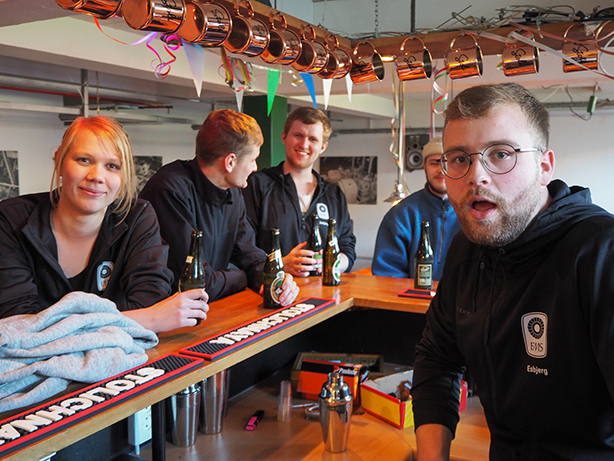
FMS places great importance on the study environment, so you’ll find an inclusive atmosphere where there’s a close bond between students and staff.
At FMS in Esbjerg, there are plenty of opportunities to network with fellow students – both Danish and international. Education Esbjerg regularly organises events for students in the city – check out their events page here!
Would you like to meet up with your fellow students? Then pop into the student café, Krumtappen, which is run by fifth-semester students.
Practical stuff
Nice to know
Shortcuts
We use Teams as learningsystem.
Find the curriculum and policies via Improve (quality assurance system)
If you need IT help but are not near our IT support team, they can sometimes help you via TeamViewer.
Book order
On the Polyteknisk Boghandel website, you’ll always find book lists for the respective semesters.
- Follow the link above. Click on ‘Maskinmesteruddannelsen’.
- Click on the search box and select the correct semester.
- Select the books or book packs you wish to buy
- Pay
If your books are being paid for by a shipping company, a rehabilitation scheme or another organisation, please send an email to the bookshop with details of where the invoice should be sent, including the contact person at the paying organisation.
Computer
As a student, you are expected to have a laptop. When you start your programme, you must bring it with you from day one.
The university’s IT department recommends that students have a computer running Windows as the operating system. This is because the simulation programmes you will need during your studies can only be installed on Windows computers. As a general rule, the IT department does not provide support for Macs.
It is also recommended that your PC has at least 8GB of RAM, an 8th generation or later i5 or i7 processor, and a wireless network card capable of running 802.11n (5GHz) or better. You should also have an SSD with 128–265 GB of storage space.
Please feel free to contact the IT department if you have any questions about what to buy, or whether your current computer is suitable for your studies.
N.B.: As a student at FMS, you are entitled to a free Office 365 package, so you can easily buy a PC without an Office package.
Photo for student ID card
You will need a photo of yourself for your student ID card.
The photo must be a portrait (like a passport photo) of yourself against a neutral background.
The photo must be both sharp and well lit (preferably taken in daylight).
You can upload the photo via the website: my.fms.dk
If you’re using your mobile, you can also take a photo instead of uploading one.
- Select “Dine oplysninger”
- Select “Ret” under personal details
- Select “Upload” in the image area and select “foto” (On your mobile, you can also choose “Kamera”)
- Select “Gem”
- Select “Luk”
After 24 hours, your photo will be visible under your details on my.fms.dk
At the start of the academic year, you will be given your new student ID card during the IT introduction.
Office 365
As a student at FMS, you can download a free Office 365 package.
To get your free Office 365, you must first log in to your student email, and then you can do the following:
- Click on the nine dots in the top-left corner and select ‘More apps’
- Click on the blue button on the right-hand side labelled ‘Install apps’
- Choose Microsoft 365-apps
- An installation file is being downloaded to your computer.
- Open it to install Office 365
You have five licences, which are for your own use only – not for family or friends! The Office suite is valid for as long as you are a student at FMS.
Special educational support (SPS)
Students who require special assistance or support can apply for special educational support to ensure the best possible study experience.
Further information is available at www.su.dk or by contacting the study secretary, Christina Hybel Østergaard, at cho@fms.dk or on 76 20 65 38.
Student number and password
You will need your student number and a password to log in to the FMS intranet, email, etc.
Your details will be fully set up in the university’s systems approximately 7 days before the start of the semester, so it is only then that you will be able to do the following:
Send a text message to +45 35 74 50 47, stating ‘kodeord. You will then receive a text message containing an automatically generated password.
Your student number is also included in this text message. It consists of a series of letters followed by a 7-digit number, e.g. GFR2024299 or EES2021999.
When logging in to various sites, you will often need to enter your full student email address, which is [your student number]@edu.fms.dk
Please note that you cannot change the password to one of your own choosing. The only way to change it is by sending another text message as described above.
Student mail
We never use your personal email address, even if you provided it when you applied for the programme. It is therefore very important that you check your student email – and, if necessary, ensure you can receive emails on your mobile phone.
Please note: You may experience problems accessing the link below if you are using Firefox as your browser. You shouldn’t encounter any problems using Chrome, Internet Explorer or similar browsers.
Go to your Webmail.
Enter your username (your student email address) and the password you were given for the FMS network.
Your student email address is: [student number]@edu.fms.dk
Student Counselling
Do you need guidance with your studies? We have student counsellors attached to each department.
You can contact the student counselling regarding:
- Exemption in the event of failed examinations.
- Guided tour of FMS – you’ll usually be paired with a student
- Personal or social problems whilst studying.
Student portal
On the student portal (UMS), you can view your timetable and, amongst other things, register your mobile number so that professors can send you messages – for example, to let you know if they’re off sick – via text message.
- Go to my.fms.dk and log in with your username and password
- Go to “Mobilnummer” and check that your mobile number is registered
- If it isn’t already there: Add your mobile number
SU and SU loan
You can apply for SU online via the SU website www.su.dk.
It takes 2–3 weeks from the time you submit your application until you receive a reply. The response will take the form of a grant notification, stating how much you will receive, how much will be deducted in tax, whether you will be granted a student loan, etc. If it has taken longer than this, it may be because the SU system has not received your tax details, or because you have not completed the application form correctly.
At www.su.dk, you can:
- Apply for SU and SU loan
- Change your residential status
- Change tax card
- Calculate your tax-free allowance
Guidance on SU:
If you need guidance on the SU rules in general, or specifically regarding your own case, you can also send an email to the Student Administration or find the information yourself at www.su.dk
Payment of SU:
SU is paid in advance and is credited to your NEM account on the last banking day of the month. You will receive SU from the month in which you applied for it at the earliest.
Other types of loans and financial support
Study loan
You can apply for a student loan online at the same time as applying for SU, or at a later date. Don’t forget to approve the loan!
Grants and trusts
It will be possible, to a limited extent, to obtain other forms of support. Lists of a number of grants and foundations that provide support to students can be found, for example, in the Grants Handbook and at www.legatnet.dk.
You can also find more information about applying for scholarships at www.fundraising.how
Teams (LMS)
Teams is the school’s learning management system, where much of the written communication between professors, the school and you as a student takes place.
Here you will find teaching materials, assignments, course plans, information from lecturers and much more.
Through Teams, you’ll always be kept up to date regarding preparation for lessons and individual courses.
It’s important that you keep an eye on the news forums you’re subscribed to, as this is where news from the school will be posted.
Transport
If you would like a discount on a train or bus pass, you should apply at www.ungdomskort.dk.
It is also possible to apply for a mileage allowance for travelling in your own car. However, there are certain criteria that must be met. You can read more about this on ungdomskort.dk.
If you need any guidance, please contact the study secretary, Christina Hybel Østergaard, at cho@fms.dk or on 76 20 65 38.